This trick is based on the VPN and is fully optimized with the Browser, no Lags at all. All the Security protocols are supported just keeping your Data on the safe side.


This trick is confirmed working in Delhi and other States. Included are the two configs of the Vodafone and Airtel you can try it in your state and just leave the comment if you face any difficulty. The trick was last checked on 28 March as you can see from the Screenshot.
Whats there in this Config ?
This Whole *.rar file include the both Vodafone and Airtel Config which are almost working everywhere and confirmed in the location which are mentioned above. APN to be used for Airtel is airtelgprs.com and for Vodafone the Trick is based on the portalnmms APN for some states you can also try on www.Benefits of the Trick:
- Download the Torrents at the High Speed : For a every Internet Surfer downloading the files freely from the Internet is the Main Aim, one gets a better feeling when he downloads the files freely from the internet giving a chunk the Internet Providers
- Browsing has been made easy: No Adds or Popup in between the Browsing of the session, You will get the better experience while browsing.
- Just a One-Click Connect: It’s very simple in connecting to Internet like the Simple Dial-Up connection, the connection will be established in a second and will not even disconnect in a long session.
- Supports Different Protocols : All the IMAP, SMTP and other Security Protocols
OR
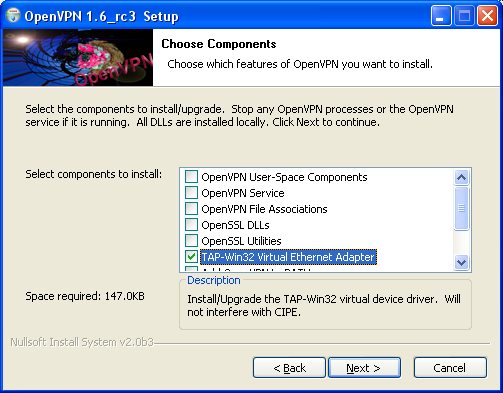
- Download OpenVPN package for Windows (version 1.6 or later)
(OpenVPN package contains TAP-Win32 Virtual Ethernet Adapter driver) - Execute the openvpn installer (openvpn-1.6-install.exe)
- select “TAP-Win32 Virtual Ethernet Adapter”
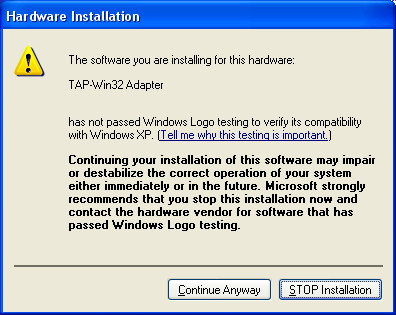
(you may select other components, if you want) - answer “Continue Anyway” to “Hardware Installation” warning
Get the Trick : Configuration Type
How to Configure VPN Config
- At first you Must download the NMD VPN and the config files.
- OK After downloading this config and NMD VPN just Install the VPN.
- Now replace the downloaded config file in the NMD VPN : Program Files folder.
- Run the NMD VPN
Windows 7 and 8 Users : Make sure you have run the Program as the Administrator.
- Just connect the with any of the two servers, if you are experiencing the disconnection problem then try the second config.
- The connection will be established instantaneously.
Screenshot of the Trick :

This trick is confirmed working in Delhi and other States. Included are the two configs of the Vodafone and Airtel you can try it in your state and just leave the comment if you face any difficulty. The trick was last checked on 28 March as you can see from the Screenshot.

No comments:
Post a Comment