Wednesday, 29 May 2013

BOXOPUS Best ZBIGZ Alternative ALL Download Manager Supported

The Best ZBIGZ alternative is out of the BOX now. Yes, BOXOPUS is the best ZBIGZ Alternative which supports almost all the Download manager ranging from the Internet Download Manager to Download Accelerator, almost every. ZBIGZ was nearly charging money $ to take their subscription and then download the file.
We have previously discussed HOW TO BYPASS THE ZBIGZ Premium Account feature, many of the users were succeeded in bypassing the premium Cookies, but those who were new to the world of the free internet via Proxy and VPN (VIRTUAL PRIVATE NETWORK) were finding tough to implement that method, I too quite agree with that it was the methods for the Computer Geeks.

Many of the USERS are unable to generate the cookies for ZBIGZ so BOXOPUS an alternative this is the link to Boxopus Invite Code Just get the code and apply them.

Get Invite Codes : Updated 1st January. Get it Before they finish


Features of BOXOPUS : Best ZBIGZ Alternative

  • Unlimited Download Supported.
  • Cache Unlimited files.
  • Files stored for more than 7 days.
  • Parallel download’s Allowed.
  • Super Fast download Speed.
  • Resume download.
  • Supports all the Download Managers.

Implement BOXOPUS : Best ZBIGZ Alternative

  • AT first you must Navigate to the Official website and Register for the Account.
  • You can also use your social networking account to create the Account.
    Method is Similar to the case of Furk.net
  • OK After signing in your Account, Just select the Tab and Paste the Magnetic Link or the torrent LINK based.
  • You can also Upload the torrent files.
  • Click on the Put in the DROP BOX option
  • It Will start Caching the files, and once the caching is complete you can CLICK on the download Button to start downloading the files.

BOXOPUS : Best ZBIGZ Alternative

Best ZBIGZ Alternative

This will allow you to download the unlimited Data. Enjoy this free torrent leeching website that is integrated with the High Speed Servers, Its the Best ZBIGZ Alternative which will allow you to leach for free.

Many of the USERS are unable to generate the cookies for ZBIGZ so BOXOPUS an alternative this is the link to Boxopus Invite Code Just get the code and apply them.

Get Invite Codes : Updated 1st January. Get it Before they finish

IDM Optimizer : Increase IDM Internet Download Manager Speed

Internet Download Manager is the best Download Accelerator which is consistently performing from a Half Decade, IDM optimizer no download manager can lead the IDM. Many of the users still thinks that they are fully utilizing the speed offered by their ISP, but I will like to put a full stop on their sentence, as I tested the IDM optimizer last day and found fabulous.
Yes, IDM optimizer will increase the speed a lot by modifying and tweaking the registry files.

Features Of IDM Optimizer :

  • It increases the Maximum Number of connections.
  • Parallel download support Limit increased.
  • Stable Speed maintained.
  • Fault tolerance included.
IDM optimizer : You have to first Install the IDM (Internet Download Manager), after that this Optimizer will  work, their is a Maximize button in the optimizer which will re-tweak the settings of the IDM and anytime you can revert back the changes by clicking on the Restore Default.
IDM optimizer

Configuring IDM Optimizer :

  •  IDM must be Installed to get this tweak work, you must have the registered version of the IDM.
  • Now open the IDM optimizer and click on the Maximize button, make sure IDM is running in background process.
  • This will boost the downloading speed of the IDM and will utilize the full bandwidth offered by your ISP.
If in case you are not satisfied with the performance of the IDM optimizer then you can revert back the changes by clicking on the Restore default Button.
Well, from my side I have tested the speed and gained the result about 30% extra. You Must atleast give a try if you are the real download lecher.

How to Unlock Idea NetSetter E1732 via Codes and Flash

Here is the complete easy way to unlock Idea netsetter, many of the users have previously tried to unlock the Idea Netsetter luckily some of them have successfully unlocked it to work for the other networks but the bad side is that many of the users bricked their Idea Netsetter resulting in No signal or unrecognizable SIM.
The Method included is the simple tutorial and you will not face any difficulties to get it unlock, You don’y have to downgrade the firmware and then again flash it, that were the talks of the old days, for unlocking Just follow the instructions to unlock the Idea NetSetter :

How to Unlock Idea NetSetter :

  • Install the Idea Dashboard as Normal
  • Now download the latest version of the Mobile Partner
    Download Now : Mobile Partner 
  • Install and connect the Modem
  • You have to run the Mobile Partner Software and it will automatically detect the Modem
It will take some time to detect the Modem, so please have some patience “Don’t Panic”
  • OK After successful flashing you need to make the manual settings for the ISP you want to use
 Lets take an example of the Airtel
  • To make the Airtel Profile Navigate >> Tools >>Profile management >> Click on New >>Type Profile name as  Airtel >> In APN select the STATIC Radio Button >> type  airtelgprs.com
  • Click OK and Save it.
Now Insert the Airtel SIM or any other SIM according to your need and Simply click connect, your device is now unlocked to work on any network.
Airtel – airtelgprs.com
Aircel – aircelgprs
Idea – internet
Vodafone – www
Relince – rcomnet
BSNL – bsnlnet
MTNL – pps3g
Docomo – Tata.Docomo.Internet
Uninor – uninor
Here is the List of APN and the operators, you can manually configure your Data profile. Similarly you can also unlock other variant of the  Unlock Idea Netsetter .

Screenshot of Unlock Idea Netsetter :

Unlock E1732 Idea Netsetter

Question/answer : Unlock Idea Netsetter
  • Ques :  Will it be permanently unlocked ?
    Ans  :   Yes, until you flash it via the default Firmware
  • Ques : Does it will void the warranty ?
    Ans  : Yes, you can reflash the stock firmware and you will gain your warranty back
  • Ques :  Is their be any connectivity Issue ?
    Ans  :  Nopes, You can normally connect your ISP with no Hassles

Now Move forward and Unlock Idea Netsetter without any issues

Crystone Hosting Deal at 0.99$ Per Month : Make Your Website

Crystone Hosting is the Most expensive Hosting we have But we are having the real Crystone Hosting deal offering 82% OFF i.e 0.99$ per month which will help you in creating your own website. Yes this sounds true you can create your own website in affordable rates and your pocket will surely allow it. Crystone is one of the best Hosts available they offer you the services what they Say for. Crystone not only sounds good you can also examine its functionality.
In this Winter Season Crystone is Just offering the real discount deal. Don’t waste your time searching here and there for the reviews of the other company. Crystone is the 16 Year Old company and is providing the best of the hosting services. Crystone is hosting more than 30,00,00 websites and is still growing on. The company is on the best of his Boom and is ready to handle all these services.
Crystone hosting deal

About Crystone Hosting :

When Google was just a Teenager, crystone has put their hands on the Ugly Cycle of the Internet in 1997 i.e 15 years. And if you are handy in the Golden Google then you can easily find the reviews of the crystone and mostly all the reviews are in the positive side of the Crystone.
Comprising of the Modern Data Centers located at  Stockholm provides the best web hosting experience to the
customers. Moreover crystone is hosting over more than 30,000,000 websites. That means its a sign of the stability and Trust Safety whatever you call.

Why should I Choose Crystone Hosting Deal ?

  • UNLIMITED Disk Space
  • 7 DAYS A Week and 365 Days a year Live Chat support,
  • Power Full Data Center
  • UNLIMITED E-mail Accounts
  • UNLIMITED Bandwidth
  • $100 Google Adwords Credits
  • 1 year – $0.99/mo LIMITED OFFER
  • Flexible, Easy to Use Control Panel
  • Unlimited Sub Domains, FTP Accounts, and Email Accounts
  • 99.9% Uptime Guarantee
  • No Contract with a 45 Day Money Back Guarantee
  • Guaranteed Inclusion in Google, Yahoo! and Bing
  • WordPress Hosting – Host your very own WordPress blog
  • Automatic Weekly Off-Site Data Backups
Crystone hosting deal coupon

How Can I get the 82% OFF on Crystone Hosting

  1. Simply Visit Crystone Special landing page
  2. Now Click on Signup
  3. Select Crystone Mini and Add it to the Cart
  4. Select for 1 year.
  5. On Shopping Cart Apply Coupon Code: “SPRING
  6. Thats All, you will be charged just $0.99 USD per Month
  7. Total Value will be $11.88 USD for 1 year
  8. Pay the Amount by Credit card or Paypal Account.
Expires: Never Expires
Coupon code : SPRING
Just Click on the Coupon Code and you will be directed to the Official Website, Coupon will be copied.
I am not done here if you have purchased this Hosting from us then we are ready to provide theFull support like Blog Setup a Genuine eleven 40 theme with the Customized plugins and all.
Just message me the details after purchasing the hosting, that what type of customization you want

What I will be offering on Purchasing the Crystone Hosting Deal from openUDP.com

  • SEO Plugin : For the Better Google Ranking and Optimization
  • Comment Luv Premium Plugin with License
  • Advance Social Sharing widget with Premium License
  • Genesis themes : I have the package that I purchased in Black Friday
  • LOGIN Lock-down : Security for your WordPress website
  • WP3 Cache : For Faster Load-up
  • Backup Database : For constant Database backup and Many more.
Just give a try to this Hosting. As I have. and I was quite satisfied by the Performance and support of the Hosting Company. Everyone knows that 11.88$ will not cost much. Its the quality not quantity
Expires: Never Expires
 Coupon code : SPRING
 

Buy Micromax A116 Canvas HD : SnapDeal.com

Micromax A116 the most popular handset on the popular websites Like GsmArena is now available at the Official Stores and websites, the famous online delivering website eBay is also in this Race and has pre-booked the order for this Handset. This Set is giving quite tough competition to one of the luxurious mobile Series i.e Galaxy.
The wait is now over and the most demanding handset is now available at the Official Website, which is perfected by the snapdeal.com satisfying the best buy at INR 13,900. This range is quite enough for this Handset and will be the best value for the money.
The Handset is best in his class and can be your valentine for this Month as it has been powered by the 1.4 Quad Core Butter performance inspired by the IPS HD Display and perfected by the Latest Android at the Backend.
MicroMax A116 1.4 Quad Core is available online from 14th Feb onwards, there are many websites which are claiming the pre0dlivery of the Handset,  its advised not to go for them BUY only from the Official Stores. The Handset was first raised at the 15K prices but on the other hand Karbonn S1 titanium in that price Range.

Grab this : Micromax A116 Buy Online

MircroMax A116 which is crafted and perfected with High Specifications, this Handset is power Packed by the Quad Core performing Processors for the Buttery performance, similar to the project butter. On Ordering this Handset you will receive it in 5-7 working Days which is guaranteed by the MicroMax and supporting partner SnapDeal.com as per the huge demands and supplies the stock for the 14 FEB is now over but MicroMax Claimed that they will supply the demands daily with the total quality and perfection.

Micromax A116 key Features

  • Perfected by the 12.7cms (5) HD screen
Welcome the Android on the Giant 5 HD Screen powered by the IPS technology featuring the 1280 X 720 resolution which will give you the new Android Experience and the latest Movies at the 1080P HD Screen see the colors which will get live at the sight.
  • Buttery Hardware Acceleration
When it comes to the performance then its directly proportional to money, but this time the case is different The QUAD CORE  1.4 GHz processor Will be yours at just 14K giving the best performance and speed to high end Graphic Games Like NOVA 3 and Street Fighter. The Handset is supported by the 1GB DDR2 RAM for the Android Games and Buttery Performance.

  • 8 Mega Pixel Camera
Now Never miss the Precious moments of the Dear Ones. Yes, this Handset is powered by the 8 MP camera integrated with the may new features Like LED Flash Auto-focus, Zooming features  and many others, there is also a secondary or front facing Camera of 2 Mega Pixel for the Video Calls and Chats.
  • Android Jelly Bean
Android Jelly Bean, the Heart of the MicroMax Super Canvas is supported by the Quad Core Processors which means it will give the absolute stunning performance. The Best Key Point of this Handset is that It will be able to Handle all the future Android Operating Systems which will be released by the Google. Performance of this ON THE Android OS is best and will never create any Hangout Situations. The Overall Experience on this Handset is Excellent.
  • Data Connectivity and Battery Life.
Sharing is Caring, Get social with this High End phone and get engage with the Many Social tools and applications. Get your Favorite Track within seconds Transfer the files via Bluetooth 4.0 and for the its integrated with the USB 2.0 for better Data Transfer. MicroMax A116 supports 21MBPS and can also work as the High Speed Modem for the PC via the PC Suite. The A116 Comes with 2100 mAh of battery life to power this phone 1 day with fully battery charged. Beside these stunning features of the MicroMax A116 it is integrated with the 2100 mAH battery which will give you the complete Backup of 1 or 1.5 Days ( Using DATA services) and ideally it would also last for long.
Common Get this Handset Online and Grab it before Some One else from Official Micromax website
I know you will be getting excited after reading this, so don’t put a stop here and just go and grab this deal from the Official stores. This is one of the Best Low Budget Phone which is powered by the Quad Core Processors, don’t think Just Grab it. Soon We will be releasing the Hands On Review as I have Ordered this Set for myself.

UC Browser 8.9 for Android Download Now : APK Files

UC Browser 8.9 the best handler for the Android Series is out now. You don’t need to be the Android Tricky or Geek. Just Download this *.APK file and put the step in the new exploring world of the Internet. This Browser is embedded with the support for the Front and Back Query. For Installing this Browser you Must be on the Greater Version of the Android 2.1 or more.
Super User Mode OR Root access is not required for this Handler.

Feature’s and Benefit :

  • Front and Back Query Support.
  • No Root Access Required
  • Compatible for the Android OS
  • Support for the Large Files
  • Touch Response User Interface.
  • Custom Short-Cut Icons
  • Proper Optimization of the Webpage.
  • File Manager has been integrated with new functionality.
  • Twitter Sharing.
For Android Users : The Problem of the Force close of application is still existing in this release, but that’s not the Big Issue and soon will be covered in the next release.

Download UC Browser 8.9 For Android
Download UC Browser 8.8 for Symbian

For Symbian Users  : If you get the certificate error then make sure you have the latest certificates Installed and if you have any previous versions Installed then uninstall it before installing this release

Airtel TCP VPN Trick Working With PD-proxy and VPNBOOK

Time for the North Indian to Rock Again, Airtel TCP VPN yes this is once again the Party In Mind trick and confirmed working in the UP East and West Side. The trick is based on the VPN Book and Some Times also worked with the Old Age Home PD-Proxy even with the Demo Account. I cannot confirm, but after 3-4 attempts with the PD-proxy the Airtel HSPA network was tweaked Again. You can utilize the full of the Airtel 3G network.
If you know how to configure this trick with the PD-proxy then its best for you as their is no disconnection problem in that. All the IP-address and Hosts are in the Config File, and you can easily tweak with it. I have attached a Screenshot when configured with the PD-proxy.

Benefit of this trick :

  • HTTP and HTTPS Protocol Supported : Many of the online users use the eCommerce websites Like eBay and other Secured websites which uses the HTTPS protocols are now supported under this Servers.
  • Zero Balance Condition : Connection will be established at Null Balance, no need of any plan.
  • Android System Supported : This trick can also be configured in the Android OS via the VPN Droid or the Feat VPN as they allow you to create the Config File.
  • Torrents Supported : Torrent Addicted Smoker, no need to worry as your food for life is already supported. If you face some difficulties in Downloading trick via uTorrent then you Must try the ZBIGZ Premium Version Trick
  • Download Status : You can download the File in Parallel and can even resume it.
  • VPN Stats : No extra Pop-up adds and Mal-ware Websites. Just browse in the Clean Environment.

Benefits of the PD-proxy Account :

  • Parallel Download Support
  • YouTube streaming with Low Memory Consumption
  • No Pop-up or Banner Adds
  • Use the default APN : airtelgprs.com
  • No Disconnection or Isolated Downloads

How to setup this trick in Windows Platform :

  • It is pre-considered that you already have the NMD VPN installed, if not then Download it from Here
    Download : NMD VPN
  • If you are using the NMD VPN fr the first time then make sure you have the TAP drivers Installed.
Windows 7 and Windows 8 Users RUN NMD VPN as the Administrator, if you are not doing this the NMD VPN will not be getting connected to the SERVERS.
  • Connect with the Download Configuration and your connection will be established.
You can also try this with the VPNBOOK my simply pasting the download config in the CONFIG folder where the NMD VPN is Installed.

Screenshot of the trick :

Airtel TCP 443 Trick

Connection will not be established for the first try to reconnect three to four times and at last it will established.

Airtel Trick for Android Symbian and PC

This is the all in one Trio for the Mobile and SYSTEM platform processing as the Airtel Trick front query and Back Query. Derived trick is based on the Handlers and Query processing which means that it will work on the latest Android Platform and Symbian Platform. One of the Best Handlers Which will give you the awesome transfer rate and can be challenging to the UDP trick. All the methods regarding the different platforms have been posted.

Benefit of this Airtel Trick :

  • Can be configured for the Android Device’s Using Handlers
    Download Handler for Android : For Android GingerBread and 2.3.6 Upper Versions
  • HTTP and HTTPS Protocol Supported : Many of the online users use the eCommerce websites Like eBay and other Secured websites which uses the HTTPS protocols are now supported under this Servers.
  • Zero Balance Condition : Connection will be established at Null Balance, no need of any plan.
  • Torrents Supported : Torrent Addicted Smoker, no need to worry as your food for life is already supported. If you face some difficulties in Downloading trick via uTorrent then you Must try the ZBIGZ Premium Version Trick
  • Download Status : You can download the File in Parallel and can even resume it.
  • VPN Stats : No extra Pop-up adds and Mal-ware Websites. Just browse in the Clean Environment.

OK, Just explaining the method :

  • If you are using mobile partner/ Micromax dashboard then create a new profile with any Name
  • Now setup the APN as airtelgprs.com
Make sure you have the Mozilla Firefox Installed.
  • Now enter any of the following proxies in the Mozilla Firefox
    Proxy : 184.22.241.96
    Port : 80
  • Setup the Port as : 80

Screenshot : New Airtel High Speed Proxy Trick (Not-available)

Airtel High Speed Proxy Trick

Trick is confirmed working in Karnataka and many other states, just try this via the following different platforms like Android, Symbian and VNAP Buster. You will get the awesome Transfer rate, if you face any difficulties in configuring this then do leave a message, we will try our best to figure it out.

Airtel Speed Capping Solution : UNCapping

Hello, lechers this is one of the finest Speed Uncapping solution which will atleast try to cure the Speed Capping Fever from the Airtel SIM. You Must give it a try and rest all depends on you luck, some of the users will be having the doubt about the 50 MB Circle Loop, that the speed will be capped again. To overcome this Kindly disconnect your Data Connection after 35 MB, if you will exceed your SIM will get blocked or Speed Capped.

OK Lets Proceed with the Steps :

  • At First Make your Balance to Initial Zero Condition.
  • Now activate all the Zero Rental plan or any existing plan on that SIM even also the 3G plan.
  • Wait for atleast 24 Hours or more near about 2 days and activate by 3G dialing *121*11#
  • Again dial *121*11# and MOVE TO 3G Data Plans and Select the Zero Rental Plan
This will Uncap your speed. Do leave your comments after trying this. Don’t be so furious to leave your comments today only, atleast wait for 24-48 hours.

Vodafone VLIVE UDP Trick

Vodafone UDP trick is once again screwed. The trick is worth and is giving awesome internet experience even this trick can be configured for the Android via VPN. This is the UDP trick and is far better than the TCP one. UDP trick is confirmed working in the North Side. Thanks to Symbianize for the VPN. There is no SIM blocking or capping limitation. Just connect the VPN and you are ready to go.


Features of the Trick

  • High Speed UDP trick, with unlimited Data Transfer.
  • No Data Disconnection
  • No ADDS and Pop Up
  • HTTP and HTTPS Supported.
  • High Speed Torrent downloading.
  • Just Change the Port and enjoy the downloading in Torrent.

How to Setup the trick

  • APN and other settings are encrypted and in the same file.
  • You don’t need to be a Geek for this, simply download this file and connect with the APN
    Download the VPN Here : Get it Now


  • After downloading the VPN, extract and RUN it. It will be connected in the First Attempt.
  • Hit OK and Enjoy.

Screenshot for the Trick :


Update : If you have already activated the 3G Pack in your Vodafone SIM, then no need to get panic as after connecting with the VPN, your Data balance will not be deducted. If you face any difficulty in configuring this then do leave a message.

PD-Proxy : The Best Tunneling Client

PD-Proxy is the best VPN available in the Internet. There are Many Private VPN available that are fully loaded with the Adds and other malicious activities. PD-proxy is the best tunneling Client which will create a Separate VPN network between you and the other organisation (target)
Benefits OF Pd-Proxy that helps in maintaining the following properties.
  • Confidentiality : The Data sent over network is Highly encrypted and can-not be viewed by the third party
  • Integrity : All the Data Sent over network is integrated and therefore trustworthy.
  • Noise Proof : Data is not lost in the way, so as reduces the Noise in the Data
There are many other benifts of the PD-proxy like accessing the blocked website, for example : there are many websites that are specially blocked in the particular country i.e users can-not use or browse it via the normal connection, but accessing that website has been made possible by the PD-proxy, yes it creates the VPN, by hiding your original location.

Look Here How it works :

pd Proxy woring

This is the whole concept by the PD-proxy. There are may VPN providers lying around but the best among them is the PD-Proxy which allows you to choose from the Multiply servers categorized in the different-different categories Like Torrent Servers- Location Based Servers etc.
PD-proxy also offers the trial usage before buying, for this it requires the separate VPN client which you can directly download from the Official website PD-Proxy 

How to Setup PD-proxy :

  • Visit the Official Website : PD-Proxy.com
  • Download the VPN Client
  • Register for an account
  • Enter the account details and select the Server
That’s simple, PD-proxy is simply clever as it will setup all the TAP drivers and will scan the open Ports on its own. Now you can access the blocked website and can even tweak with the network.

Idea UDP Trick 2013 With Torrent Support

Idea Has been once again tweaked with the torrent support Yes the Old Days are Back IDEA UDP trick 2013 has been in Hike and is now supporting the premium torrent and Resume downloads. Idea UDP trick again came into existence on the APN : Internet and on old SIM its working on the APN : ideafresh. Previously we shared the Vodafone trick which was only for the some users so we password protected it. This time his case is not there as this trick is posted openly. Check the VLIVE UDP Trick  : Some of the forum members said that the VLIVE APN dOES NOT EXIST, to clear there MINDS, we cross checked the APN  and its was found to be VLIVE.NET and its exist. So Kindly do not post anything Like that.

Benefit of this Airtel Trick :

  • Working with Blocked SIM : This trick is working with the Blocked Airtel SIM, with no Balance or Capped Speed condition.
  • HTTP and HTTPS Protocol Supported : Many of the online users use the eCommerce websites Like eBay and other Secured websites which uses the HTTPS protocols are now supported under this Servers.
  • Zero Balance Condition : Connection will be established at Null Balance, no need of any plan.
  • Torrents Supported : Torrent Addicted Smoker, no need to worry as your food for life is already supported. If you face some difficulties in Downloading trick via uTorrent then you Must try the ZBIGZ Premium Version Trick
  • Download Status : You can download the File in Parallel and can even resume it.
  • VPN Stats : No extra Pop-up adds and Mal-ware Websites. Just browse in the Clean Environment.

How to setup this trick in Windows Platform :

  • This Trick is based on the VPN powered by the Symbianize.com

Download VPN : Idea UDP with Config Files


Password : udptrick
  • If you are using this VPN For the first time then make sure you have the TAP drivers Installed.
  • The Config is integrated in this VPN no Need to download it separately. Just establish the Mobile Data Connection
Windows 7 and Windows 8 Users RUN  VPN as the Administrator, if you are not doing this the  VPN will not be getting connected to the SERVERS.
  • Connect with the Download Configuration and your connection will be established.
You can also try this with the VPNBOOK my simply pasting the download config in the CONFIG folder where the  VPN is Installed.

How to Get RID of the Adds In the VPN :

  • What you have to do is to download this File and Pate it in the
    C:\Windows\System32\drivers\etc
    Download this File : Remove Adds in VPN

Screenshot of the trick :

Though I get the BAD Idea Signal in my Area only a One Bar as you can see from the Screenshot But Still I am getting near about 350 KBPS FOR THE AREA having good signal strength. the speed can vary from 600-700 KBPS on an average. The trick also have the torrent support when used with the Different VPN Client Like PD-Proxy.

Screenshot of Torrent :


Connection will not be established for the first try to reconnect three to four times and at last it will established.

Reliance 3G Trick for GSM and CDMA Network March

Reliance recently blocked all the open Port Tricks for the North Region under which Delhi was Highly penalized. The Uploaded trick is for the reliance and is working on the Both GSM and CDMA network. I have recently tested this trick on my CDMA modem which was lying and was no use but the result was quite amazing as the VPN connection was established and was giving quite High Rate.
No need to make any recharge in this Trick and is working in the Zero Balance. APN to be used is the default one romnet and for some states its working on the rcomwap APN.

This Trick is based on the Two Servers

  • Server 1 : IS IDM and Resume Supported
  • Server 2 : Torrent Support Only. And is quite not speedy

Benefit of this Reliance 3G Trick :

  • Working with Blocked SIM : This trick is working with the HMS, with no Balance or Capped Speed condition.
  • HTTP and HTTPS Protocol Supported : Many of the online users use the eCommerce websites Like eBay and other Secured websites which uses the HTTPS protocols are now supported under this Servers.
  • Zero Balance Condition : Connection will be established at Null Balance, no need of any plan.
  • Torrents Supported : Torrent Addicted Smoker, no need to worry as your food for life is already supported. If you face some difficulties in Downloading trick via uTorrent then you Must try the ZBIGZ Premium Version Trick
  • Download Status : You can download the File in Parallel and can even resume it.
  • VPN Stats : No extra Pop-up adds and Mal-ware Websites. Just browse in the Clean Environment.

How to setup this trick in Windows Platform”

For Installing this trick you must have the TAP Drivers Installed. For Windows X64 Users separate Drive File has been included in the Setup
  • This Trick is based on the VPN powered by the openVPN.com

Download VPN : Reliance Trick with Config Files


  • If you are using this VPN For the first time then make sure you have the TAP drivers Installed.
  • The Config is integrated in this VPN no Need to download it separately. Just establish the Mobile Data Connection
Windows 7 and Windows 8 Users RUN  VPN as the Administrator, if you are not doing this the  VPN will not be getting connected to the SERVERS.
  • Connect with the Download Configuration and your connection will be established.

Screenshot of the trick :

Reliance 3G trick

Second : ScreenShot of the Reliance 3G Trick : Using PD Proxy Settings


Though I get the Average Reliance Signal in my Area  as you can see from the Screenshot But Still I am getting near about 450 KBPS, FOR THE AREA having good signal strength. the speed can vary from 600-700 KBPS on an average. The trick also have the torrent support when used with the Different VPN Client Like PD-Proxy.
Connection will not be established for the first try to reconnect three to four times and at last it will established.

Airtel VPN Trick Confirmed Working

Airtel VPN trick is on the go Again, this trick is confirmed working all over India and is giving the best Speed. This is the Guest trick by one of our online reader. Airtel VPN Trick is sure shot working with all the torrent support and Resume Downloads. You can even browse the Internet from the several locations. Airtel VPN trick can also be configured in the Android Platform via the VPN DROID.
Previously we shared the Vodafone trick which was only for the some users so we password protected it. This time his case is not there as this trick is posted openly. Check the VLIVE UDP Trick  : Some of the forum members said that the VLIVE APN dOES NOT EXIST, to clear there MINDS, we cross checked the APN  and its was found to be VLIVE.NET and its exist. So Kindly do not post anything Like that.

Benefit of this Airtel Trick :

  • Working with Blocked SIM : This trick is working with the Blocked Airtel SIM, with no Balance or Capped Speed condition.
  • HTTP and HTTPS Protocol Supported : Many of the online users use the eCommerce websites Like eBay and other Secured websites which uses the HTTPS protocols are now supported under this Servers.
  • Zero Balance Condition : Connection will be established at Null Balance, no need of any plan.
  • Torrents Supported : Torrent Addicted Smoker, no need to worry as your food for life is already supported. If you face some difficulties in Downloading trick via uTorrent then you Must try the ZBIGZ Premium Version Trick
  • Download Status : You can download the File in Parallel and can even resume it.
  • VPN Stats : No extra Pop-up adds and Mal-ware Websites. Just browse in the Clean Environment.

How to setup this trick in Windows Platform :

  • This Trick is based on the VPN powered by the Symbianize.com

Download VPN : Airtel VPN with Config Files


 PASS : notice

  • If you are using this VPN For the first time then make sure you have the TAP drivers Installed.
  • The Config is integrated in this VPN no Need to download it separately. Just establish the Mobile Data Connection
Windows 7 and Windows 8 Users RUN  VPN as the Administrator, if you are not doing this the  VPN will not be getting connected to the SERVERS.
  • Connect with the Download Configuration and your connection will be established.
You can also try this with the VPNBOOK my simply pasting the download config in the CONFIG folder where the  VPN is Installed.

How to Get RID of the Adds In the VPN :

  • What you have to do is to download this File and Pate it in the
    C:\Windows\System32\drivers\etc
    Download this File : Remove Adds in VPN

Screenshot of the trick :

Connection will not be established for the first try to reconnect three to four times and at last it will established.

Airtel Front Query Trick with 3G Support for March 2013

After the performance if the Idea Trick many of the openUDP readers were satisfied, this time we have Airtel VNAP Net Buster trick, working on VNAP front queries now Its time for the Airtel now to get tweaked. One of the UDP reader asked to make the VNAP front query Handler for the both Upload and Download of Data bits. Here is the solution of that.
We usually know that Airtel front query/ back query are still working and there are many tricks which needs to be hidden for the sake of peoples.Many if us cursed openUDP for not providing the direct links, yes it sounds harsh but what about the peoples just copying the link and encrypting with the fileice or something like that.
You can also configure this trick via the Opera Handler for the USE in Mobile Version.

You Might Like: Airtel Front Query Trick Opera Mini Based for Rajasthan 2013

We already know that VNAP is on the of the oldest platform to tweak the security holes in the operator network keeping the point in mind lets tweaks it and get handy on this tutorial :

Features :

  • Front and Back Query Based Trick
  • High Speed can be used in Dual Mode.
  • HTTP and HTTPS supported
  • Mail reader IMAP SMTP and all other protocols supported
  • Dual Mode operating frequency.
  • Can only be used in PC via VNAP
  • For Mobile Use any of the Handler
  • Working in the Blocked SIM

How to Configure Airtel VNAP Net Buster :

  • Download the Airtel VNAP net Buster and Install it
    Make sure you have the .net4 Framework Installed.
    Download : VNAP Client
    Download : .net4 Framework
  • You must have the active connection based on the APN: airtelgprs.com
  • Now Run the VNAP net Buster and Configure it.
  • Open the Profile and create or edit the profile if already created.
  • Now Put the Proxy as :  80.239.243.210
    and the Set to Port : 80
    Must configure the Local Service Port 1234 or 8888
    Enter Front Query : g.co/gms/m/wap.mauj.com.php/0A/http/
  • Just have a Look at the summary of the configuration in VNAP net Buster :

Airtel TCP Trick

Airtel Working Trick via VNAP net Buster


Airtel VNAP Buster Trick
If in case you are facing difficulties in setting up this trick, then do leave your message.

Airtel UDP Port 53 Config Working Again Confirmed for UP

Airtel UDP Port 53, which is considered as the one of the best Port for the Transfer of the encrypted Data. Airtel Mainly blocked the Port 53 Ages ago on the default APN, but somehow it has been tweaked again and is presented online. This trick has been configured for the NMD VPN and can also be configured on the Android Device. This trick is the sure-shot for the UP East and West Customers and can also be configured in the Blocked SIM. If you are facing the capping issue then recharge your Number with the respective Video Calling Pack and that’s It.
I have been uploading the tricks that require the pass, due to the many copy paste actions, but this the case is quite opposite there will be no pass in the config and you can download freely.

Benefit of this Airtel Trick :

  • Working with Blocked SIM : This trick is working with the Blocked Airtel SIM, with no Balance or Capped Speed condition.
  • HTTP and HTTPS Protocol Supported : Many of the online users use the eCommerce websites Like eBay and other Secured websites which uses the HTTPS protocols are now supported under this Servers.
  • Zero Balance Condition : Connection will be established at Null Balance, no need of any plan.
  • Torrents Supported : Torrent Addicted Smoker, no need to worry as your food for life is already supported. If you face some difficulties in Downloading trick via uTorrent then you Must try the ZBIGZ Premium Version Trick
  • Download Status : You can download the File in Parallel and can even resume it.
  • VPN Stats : No extra Pop-up adds and Mal-ware Websites. Just browse in the Clean Environment.

How to setup this trick in Windows Platform :

  • This Trick is based on the VPN powered by the Symbianize.com

Download VPN : Airtel UDP VPN with Config Files


  • If you are using this VPN For the first time then make sure you have the TAP drivers Installed.
  • The Config is integrated in this VPN no Need to download it separately. Just establish the Mobile Data Connection
Windows 7 and Windows 8 Users RUN  VPN as the Administrator, if you are not doing this the  VPN will not be getting connected to the SERVERS.
  • Connect with the Download Configuration and your connection will be established.
You can also try this with the VPNBOOK my simply pasting the download config in the CONFIG folder where the  VPN is Installed.

How to Get RID of the Adds In the VPN :

  • What you have to do is to download this File and Pate it in the
    C:\Windows\System32\drivers\etc
    Download this File : Remove Adds in VPN

Screenshot of the trick :

Connection will not be established for the first try to reconnect three to four times and at last it will established. IF in case you are facing difficulties and setting up this trick then do leave a message

Vodafone VPN Trick Working all Over India

Vodafone Trick is now working again, this is the VPN trick and is working flawlessly. I have included the Demo Account for the Testing. If you want the Premium Account Just drop a message via the Contact US form. This VPN is working all over India and in nearly every state.
I have been cursed a few times, for including the password but this time it’s shared openly  with the DEMO Account if it works then I will send u a premium Account.


Features of the Trick

  • High Speed VPN trick, with unlimited Data Transfer.
  • No Data Disconnection
  • No ADDS and Pop Up
  • HTTP and HTTPS Supported.
  • High Speed Torrent downloading.
  • Just Change the Port and enjoy the downloading in Torrent.

How to Setup the trick

  • APN and other settings are encrypted and in the same file.
  • You don’t need to be a Geek for this, simply download this file and connect with the APN
    Download the VPN Here : Get it Now


  • After downloading the VPN, extract and RUN it. It will be connected in the First Attempt.
  • Hit OK and Enjoy.

Screenshot for the Trick :


DOWNLOADING FROM PREMIUM User Name :


Update : If you have already activated the 3G Pack in your Vodafone SIM, then no need to get panic as after connecting with the VPN, your Data balance will not be deducted.

Vodafone PortalnMMS Trick Working Again

Vodafone Portalnmms trick was blocked, but after a certain duration it is found to be working again in some of the States, after trying many of the hosts and attempt finally the Vodafone trick was working with the Kepard VPN. There is no disconnection problem in this Config, Still not sure for the UP Users. This trick is based on the Kepard VPN and I have also included the Trial Account for it in the config, if you are getting any issues then register for a fresh Kepard Account and replace it in the pass.txt and that’s it.

Benefit of this Vodafone Trick :

  • Working with Blocked SIM : This trick is working with the Blocked Airtel SIM, with no Balance or Capped Speed condition.
  • HTTP and HTTPS Protocol Supported : Many of the online users use the eCommerce websites Like eBay and other Secured websites which uses the HTTPS protocols are now supported under this Servers.
  • Zero Balance Condition : Connection will be established at Null Balance, no need of any plan.
  • Torrents Supported : Torrent Addicted Smoker, no need to worry as your food for life is already supported. If you face some difficulties in Downloading trick via uTorrent then you Must try the ZBIGZ Premium Version Trick
  • Download Status : You can download the File in Parallel and can even resume it.
  • VPN Stats : No extra Pop-up adds and Mal-ware Websites. Just browse in the Clean Environment.

How to setup this trick in Windows Platform :

  • This Trick is based on the VPN powered by the Symbianize.com

Download VPN : Vodafone VPN with Config Files

 PASS: NO PASS

  • If you are using this VPN For the first time then make sure you have the TAP drivers Installed.
  • The Config is integrated in this VPN no Need to download it separately. Just establish the Mobile Data Connection
Windows 7 and Windows 8 Users RUN  VPN as the Administrator, if you are not doing this the  VPN will not be getting connected to the SERVERS.
  • Connect with the Download Configuration and your connection will be established.
You can also try this with the VPNBOOK my simply pasting the download config in the CONFIG folder where the  VPN is Installed.

How to Get RID of the Adds In the VPN :

  • What you have to do is to download this File and Pate it in the
    C:\Windows\System32\drivers\etc
    Download this File : Remove Adds in VPN

Screenshot of the trick :

Connection will not be established for the first try to reconnect three to four times and at last it will established. IF in case you are facing difficulties and setting up this trick then do leave a message

BSNL 3G Trick 2013 Working All Over India Without VPN

BSNL 3G Trick 2013 that’s sound pretty good. BSNL Trick is live again and its confirmed working everywhere in India. This trick is formed by one of our online reader and we should respect this contribution. The trick is tried and tested in the UP East Side ( Lucknow ) and most probably it will work everywhere. As predicted if the trick is working in UP Side then it will continue to work all over India.


In this Trick NO VPN is Required, All the Instructions are Included in the Tutorial
Benefit of BSNL 3G Trick 2013 :
  • Working with Blocked SIM : This trick is working with the Blocked Airtel SIM, with no Balance or Capped Speed condition.
  • HTTP and HTTPS Protocol Supported : Many of the online users use the eCommerce websites Like eBay and other Secured websites which uses the HTTPS protocols are now supported under this Servers.
  • Zero Balance Condition : Connection will be established at Null Balance, no need of any plan.
  • Torrents Supported : Torrent Addicted Smoker, no need to worry as your food for life is already supported. If you face some difficulties in Downloading trick via uTorrent then you Must try the ZBIGZ Premium Version Trick
  • Download Status : You can download the File in Parallel and can even resume it.
  • VPN Stats : No extra Pop-up adds and Mal-ware Websites. Just browse in the Clean Environment.

How to Setup BSNL 3G Trick 2013 :

Just get this working Doc and follow the Instructions.

Download Trick :

If in case you feel any difficulty in configuring it then do leave a message and will continue to provide the tricks in the Survey Manner, Lesser the No of downloads the lesser is the chances of getting the trick Block.

Airtel NMD VPN And VPNBOOK Trick for March

Airtel NMD VPN and VPNBOOK trick for the MARCH is out now. This trick is basically the vase of the old trick which was working earlier and was blocked. But after a Sigh it was found to be working again. There were not any major changes except the Host. Yes, this trick is totally based on the Host Server trick. This means you have no chance of getting this SIM Blocked. We have also included several instructions to ubnblock the Blocked Airtel SIM.
The speed is somewhat slow as compared to the normal 3G plan, but still you van get 150+ Transfer Rate. If you are ready to spend a little then you can make a small recharge of Rupees 9, which i return will activate a 3G Pack and your speed may vary.

This is the trial Trick if it works for you then go For the Premium One

Download Trick :


Features of  Airtel New VPN Trick :

  • Use the APN : airtelgprs.com
  • Working in Both 2G and 3G Mode.
  • USE on the APN mobile
  • No registration required.
  • Based on the Airtel Ports/Idea also.
  • Download Resume and torrent support.
  • Speed is average
  • No SIM Blocking
  • Works at Zero Balance

How to Configure Airtel VPN Config

  • At first you Must download the NMD VPN and the config files.
  • OK After downloading this config and NMD VPN just Install the VPN.
  • Now replace the downloaded config file in the NMD VPN : Program Files folder.
  • Run the NMD VPN
    Windows 7 and 8 Users : Make sure you have run the Program as the Administrator.
  • Just connect the with any of the two servers, if you are experiencing the disconnection problem then try the second config.
  • The connection will be established instantaneously.
If you are getting error in the Server 1 then kindly replace the Host with the 94.249.139.3 80 and save the config or you can also choose the list of free working Homepages in your state.

GET THE Premium One


Screenshot of the Airtel Config :

Airtel 3G Trick Confirmed Working for March

Airtel 3G Proxy trick and Airtel VPN Trick is confirmed working again, one of my online friend gave me this Proxy address along with the Free Homepage and Port Address and acknowledged about the proper functioning of the Trick in his area. This trick includes the two working Home Pages and both are Speed Uncapped. Previously the Airtel Host trick was Updated and was having the little bit of disconnection problem, If you have the config file then replace the address in it. All the Instructions are included in the file only
You will get near about 400 KBPS Download Speed on the ZERO Rental Plan and no need of recharging any 3G Pack Just give a go to the Trick

You will get near about 400 KBPS Download Speed on the ZERO Rental Plan and no need of recharging any 3G Pack Just give a go to the Trick

How to Configure Airtel 3G Trick Trick

  • Just connect with the default APN : airtelgprs.com
  • And enter the following details and Home Page Address in the *.rar File.
  • Get the File Here

Download Trick :

  • All the Instructions and details are in this only.
  • After downloading this file Just configure it with the Mozilla or Opera Browser
This trick can also be configured in the Android OS also.

Screenshot


When you will enter the Homepage address it will open a Window which is Both HTTP and HTTPS protocol supported and you have to enter the WEBPAGE address in that only. If In case you are facing any difficulty in configuring it then do leave a message

New Idea UDP Trick Working in Few States

Idea UDP Trick which is working in few states, i cannot confirmed but as I found it working on the APN : Mobile and MMSC. You can try this trick on your own Luck. This trick is based on the UDP Port and after trying many Servers with the Best Tunneling Software PD-Proxy, finally an open Port was found which is still working free and with a High Rapid Speed. There is no case of Speed Capping or SIM Blocking. The Trick is confirmed working in the Area of South. The trick is last found working on 19th of March and is expected to continue. I have included the Proper Screenshot of the PD-Proxy and if you don’t have the PD-proxy premium Account then Simply Logon to HidemyAss and select the Specific proxy for the Particular area and can make your own Config.
What you have to do is to make a small 3G recharge for testing purpose usually 9 0r 10 rupees and then connect it via the config file. The connection will be established. After that connect it via the pre-configured VPN and the connection will be again established. After that browse the internet. On every disconnection the 1 or 2 MB will be deducted and not more than that.

Features of Idea UDP Trick :

  • Based on the IDEA Fresh Home Page for new or old SIMS
  • UDP Port tunneling
  • High Speed Data Transfer
  • Both the Protocols are supported
  • IMAP Messaging allowed
  • No disconnection
  • Using free VPN will show the adds
  • Torrent and other client supported via ZBIGZ.
  • IDM resumes downloads
  • YouTube and buffering websites supported.

How to Configure Idea UDP Trick :

  • At Firs download this File and

Download Trick :


Many of the users were facing problem in Downloading the Config and were requesting for the file via Email, to overcome this we have removed the survey. And do tell us the Proper method of sharing the files via comments.
  • OK After downloading this config and NMD VPN just Install the VPN.
  • Now replace the downloaded config file in the NMD VPN : Program Files folder.
  • Run the NMD VPN
    Windows 7 and 8 Users : Make sure you have run the Program as the Administrator.
  • Just connect the with any of the two servers, if you are experiencing the disconnection problem then try the second config.
  • The connection will be established instantaneously.
  • And Leave the User Name ans Password as blank
  • Select the UDP from the Protocol option and Port as 9200
  • Just hit the connect button.

 ScreenShot of the Idea Trick :


It will not be connected for the first time and do give atleast 3-4 try and it will be connected and If in case you are facing difficulties in setting up this trick, then do leave your message.

Vodafone VPN Trick Working in UP East and other States

Vodafone VPN Trick which is most probable working in UP East and other States. This trick is basically the vase of the old trick which was working earlier and was blocked. But after a Sigh it was found to be working again. There were not any major changes except the Host. Yes, this trick is totally based on the Host Server trick. This means you have no chance of getting this SIM Blocked.
The speed is somewhat slow as compared to the normal 3G plan, but still you van get 150+ Transfer Rate. If you are ready to spend a little then you can make a small recharge of Rupees 9, which i return will activate a 3G Pack and your speed may vary.


Features of  Vodafone New VPN Trick :

  • Use the APN : portalnmms
  • Working in Both 2G and 3G Mode.
  • USE on the APN mobile
  • No registration required.
  • Based on the Voda Ports/Idea also.
  • Download Resume and torrent support.
  • Speed is average
  • No SIM Blocking
  • Works at Zero Balance

How to Configure Vodafone VPN Config

  • At first you Must download the NMD VPN and the config files.
  • OK After downloading this config and NMD VPN just Install the VPN.
  • Now replace the downloaded config file in the NMD VPN : Program Files folder.
  • Run the NMD VPN
    Windows 7 and 8 Users : Make sure you have run the Program as the Administrator.
  • Just connect the with any of the two servers, if you are experiencing the disconnection problem then try the second config.
  • The connection will be established instantaneously.
If you are getting error in the Server 1 then kindly replace the Host with the 94.249.139.3 80 and save the config or you can also choose the list of free working Homepages in your state.


Download the Trick ( No Survey Required)

Screenshot of the Vodafone Config :


You can also configure this trick for your Android Handset, by following this tutorial.
If in case you are facing difficulties in setting up this trick, then do leave your message.

Airtel Opera Trick Real Handler Supported

Airtel new handler trick which is almost working everywhere, has been online now and you can enjoy the free internet ON that network. Airtel network tweak is considered to be the best one, because this one supports both the download and upload at the same time and even you can browse freely without any glitches.
You have to define the Homage for your states, and must be unique and is available freely in your state. I will also be updating the Homepages which are free for the particular States.
Do Not try the old Homepage or addresses that will deduct your balance, only used the ones which are mentioned.
If this Trick work in your state then to avoid the Speed Capping or SIM Blocking recharge with the Video Calling Pack of Rupees 62 or 63 “Rates varies as per the states”

Features of Airtel High Speed Real Handler:

  • Based on the default APN : airtelgprs.com
  • All the secure HTTP and HTTPS are supported.
  • No VPN and registration
  • Is also working in Android and Symbian
  • This is only for the default Browser
Note : Trick is not tested in the PC. Just tested in the MOBILE and found it working.
You can also configure this trick via the UC Browser Handler.
If you want to configure this via the Opera Handler then follow this Post

How to Configure Airtel High Speed Proxy Trick :

  • If you are using mobile partner/ Micromax dashboard then create a new profile with any Name
  • Now setup the APN as airtelgprs.com
  • This trick is based on the Opera Handler
    Proxy : 141.000.011..253
    or you can also try : 103.15.227.45
    Port : 80
  • Setup the Port as : 80
  • Now Change Settings in Opera
    Real Host Handler

    Proxy : 202.46.201.112

Screenshot : New Airtel High Speed Proxy Trick (Not-available)


This Real Host based are confirmed working in the UP West and South States if you do not know the Homepage of your State, then do browse this article : Check the Free Homepage of your state. You Must replace the default homepage with the working one which is free.
If you face any issue in configuring the Airtel High Speed Proxy trick then do leave a message

HotSpot Shield Premium VPN Trick : REMOVE ADDS

There are numerous tricks which are based on the VPN and are most likely used globally. One of the Major working tricks which have not been shared on the openUDP.com is working with the Hotspot Shield VPN and PD-Proxy. We all know that PD-proxy is the best tunneling client which is available freely but also requires a Premium Subscription, similar case applies to the Hotspot Shield VPN you can still browse freely but with adds which makes the Browser go slow and makes the PC Lag.
Today we are sharing the awesome trick which will work Like a Premium Account and even you will also get the malware protection from the Hotspot Shield VPN. There is no need to buy the premium account and also you don’t need to mess with the System Files as all the Files will be made available to you.

Requirements and Downloads :

  1. Host file : Get it Here  ( For Windows 7 Users )
  2. Hotspot Install it First : Get it Here
  3. Hotspot Install at Second : Get it Here

How to Install Hotspot Shield Premium VPN Trick :

  • At first uninstall the hotspot Shield VPN if you installed it MAKE SURE you are not running any VPN and give a restart to your PC.
  • Now navigate to the following directory:
    C:\Windows\System32\drivers\etc
    and replace the hosts file with the Provided One.


  • Windows XP Users have to perform the Manual editing in the Host File, The file path will remain the same
    Code:
    127.0.0.1 anchorfree.net
    127.0.0.1 rss2search.com
    127.0.0.1 techbrowsing.com
    127.0.0.1 box.anchorfree.net
    127.0.0.1 www.mefeedia.com
    127.0.0.3 www.anchorfree.net
    127.0.0.2 www.mefeedia.com
  • Now download the Part 1 file from the above section (Serial 2) from above and Install the VPN and please make sure that you have UNCHECKED THE OPTION LAUNCH AFTER INSTALLATION, and restart your PC.
  • After restarting the PC, Download the third file (Serial No.3) and Install it again, Hotspot Shield VPN dialogue box will appear asking you to Update the Version, Just hit the Update Button but UNCHECK THE OPTION LAUNCH AFTER INSTALLATION, and restart your PC.
  • Now connect with your ISP (usually free :P ) and establish the VPN Connection

Just see the screenshot of the Hotspot Shield VPN


For Google Chrome Lovers :


If in any case the Hotspot Shield VPN asks you to enter the password for having the trial account or extending the Time Period of your premium account then do not enter the details AS SHOWN above, what you have to do is to only give a restart to your browser and disconnect the VPN and reconnect it again, usually it will not ask for, but you all know that Prevention is better than cure.

Vodafone and Airtel Trick Working April 2013

This trick is based on the VPN and is fully optimized with the Browser, no Lags at all. All the Security protocols are supported just keeping your Data on the safe side.

Whats there in this Config ?

This Whole *.rar file include the both Vodafone and Airtel Config which are almost working everywhere and confirmed in the location which are mentioned above. APN to be used for Airtel is airtelgprs.com and for Vodafone the Trick is based on the portalnmms APN for some states you can also try on www.

Benefits of the Trick:

  • Download the Torrents at the High Speed : For a every Internet Surfer downloading the files freely from the Internet is the Main Aim, one gets a better feeling when he downloads the files freely from the internet giving a chunk the Internet Providers
  • Browsing has been made easy: No Adds or Popup in between the Browsing of the session, You will get the better experience while browsing.
  • Just a One-Click Connect: It’s very simple in connecting to Internet like the Simple Dial-Up connection, the connection will be established in a second and will not even disconnect in a long session.
  • Supports Different Protocols : All the IMAP, SMTP and other Security Protocols

OR

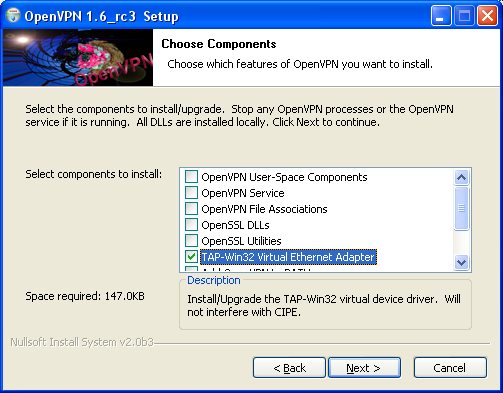
  1. Download OpenVPN package for Windows (version 1.6 or later)
    (OpenVPN package contains TAP-Win32 Virtual Ethernet Adapter driver)
  2. Execute the openvpn installer (openvpn-1.6-install.exe)
  3. select “TAP-Win32 Virtual Ethernet Adapter”
    (you may select other components, if you want)
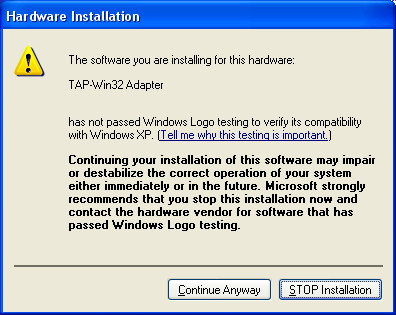
  4. answer “Continue Anyway” to “Hardware Installation” warning

Get the Trick : Configuration Type


How to Configure VPN Config

  • At first you Must download the NMD VPN and the config files.
  • OK After downloading this config and NMD VPN just Install the VPN.
  • Now replace the downloaded config file in the NMD VPN : Program Files folder.
  • Run the NMD VPN
    Windows 7 and 8 Users : Make sure you have run the Program as the Administrator.
  • Just connect the with any of the two servers, if you are experiencing the disconnection problem then try the second config.
  • The connection will be established instantaneously.

Screenshot of the Trick :


This trick is confirmed working in Delhi and other States. Included are the two configs of the Vodafone and Airtel you can try it in your state and just leave the comment if you face any difficulty. The trick was last checked on 28 March as you can see from the Screenshot.

Airtel Latest Hosts Trick Working in Many States

Its again the ANSHAN time for the Airtel Users 2013 , as one of the major trick which was working flawlessly has started gaining some issues and had just come up with the many new problems like unable to scan the ports or the disconnection problem.  Airtel has targeted the entire host which was working, but at instant they were blocked, even the most powerful tunneling client also failed in establishing the connection.
Somehow there is a host which is working in few states, but I can’t list the states in which it is presently working. This Host is working properly when configured with the PD-Proxy Client. NMD VPN users there are no need to panic as this is also compatible with that.

Benefits and Features of the Trick

  • Based on the TCP ports: You will get the enough Browsing and Downloading Speed with this.
  • All Protocols Support : Protocols Like HTTP HTTPS both are supported
  • Torrent: Torrents Download support is their when configured with the Premium Account.
  • YouTube: If you are the YouTube lover then this one is for you.
  • Connectivity: When used with the Premium Servers, you will not find any signs of disconnection; NMD VPN also works great in his Place.
  • Hosts : New Hosts, so less chances of getting blocked
  • APN: You have to use the airtelgprs.com APN for the trick

Steps to Configure this Trick:

  • This trick has been configured with the PD-proxy Account; No need to panic you can also configure it with the DEMO Account.
  • Just Download the PD-Proxy Client from the Official Website.
  • Just Navigate to the Settings Menu and Click on the Click Here to Show the Advance Settings
  • Now Click on the Parent Proxy option and input the following Proxies in the File
  • After that Click on the Header’s and add the Following Hosts.
  • Just Hit Save and Enjoy.

Get the Trick : Configuration Type

Screenshots to Configure Trick :


Working Host Trick Screenshot


Don’t Compare this trick with the UDP trick, but this trick will not disappoint you. You will get the better Browsing experience.

BSNL VPN Trick Working Again in April

Previously many of the Users enjoyed the BSNL UDP Trick and Airtel VPN trick, but few users reported that its not working properly as the host is blocked in their areas, for the BSNL Trick you don’t need any type of balance condition like Video Minutes or recharging with any kind of Minute Pack or all. What you have to do is to get the BSNL SIM and activate the 3G Network, for some Bundled SIM you have to make the recharge of Rupees 1 to activate the 3G Network.
This trick is based on the VPN, included are the two servers, which are almost working everywhere, no disclosing of the states as the trick gets blocked after certain time.

Benefit of BSNL 3G VPN Trick 2013 :

  • Working with Blocked SIM : This trick is working with the Blocked Airtel SIM, with no Balance or Capped Speed condition.
  • HTTP and HTTPS Protocol Supported : Many of the online users use the eCommerce websites Like eBay and other Secured websites which uses the HTTPS protocols are now supported under this Servers.
  • Zero Balance Condition : Connection will be established at Null Balance, no need of any plan.
  • Torrents Supported : Torrent Addicted Smoker, no need to worry as your food for life is already supported. If you face some difficulties in Downloading trick via uTorrent then you Must try the ZBIGZ Premium Version Trick
  • Download Status : You can download the File in Parallel and can even resume it.
  • VPN Stats : No extra Pop-up adds and Mal-ware Websites. Just browse in the Clean Environment.
  • At first you Must download the NMD VPN and the config files.
Download : NMD VPN “If you don’t have then download it from Here”

Download Trick :

“Note : This trick also work with the VPNBOOK”


  • OK After downloading this config and NMD VPN just Install the VPN.
  • Now replace the downloaded config file in the NMD VPN : Program Files folder.
  • Run the NMD VPN
    Windows 7 and 8 Users : Make sure you have run the Program as the Administrator.
  • Just connect the with any of the two servers, if you are experiencing the disconnection problem then try the second config.
  • The connection will be established instantaneously.

Screenshot of the BSNL VPN Trick :


Blog Archive